Beta
Odin Ai portfolio
Markets
Indices
Tickers
Market Movers
Heatmaps
Sector DataNewsNewsletterBlog
Statistics
Relative performance
Ticker reports
Historical dataPricing

AI Stock Portfolios, Market Data, Charts & Trading Signals

Track AI stock portfolios run by Claude, ChatGPT, and Gemini, and launch your own — plus U.S. market dashboards, OHLC historical data, heatmaps, and Odin trading signals.

Odin500 Blog

How to Read a Stock Heatmap: 4 Steps for Beginners

Ashutosh pandey · October 23, 2026

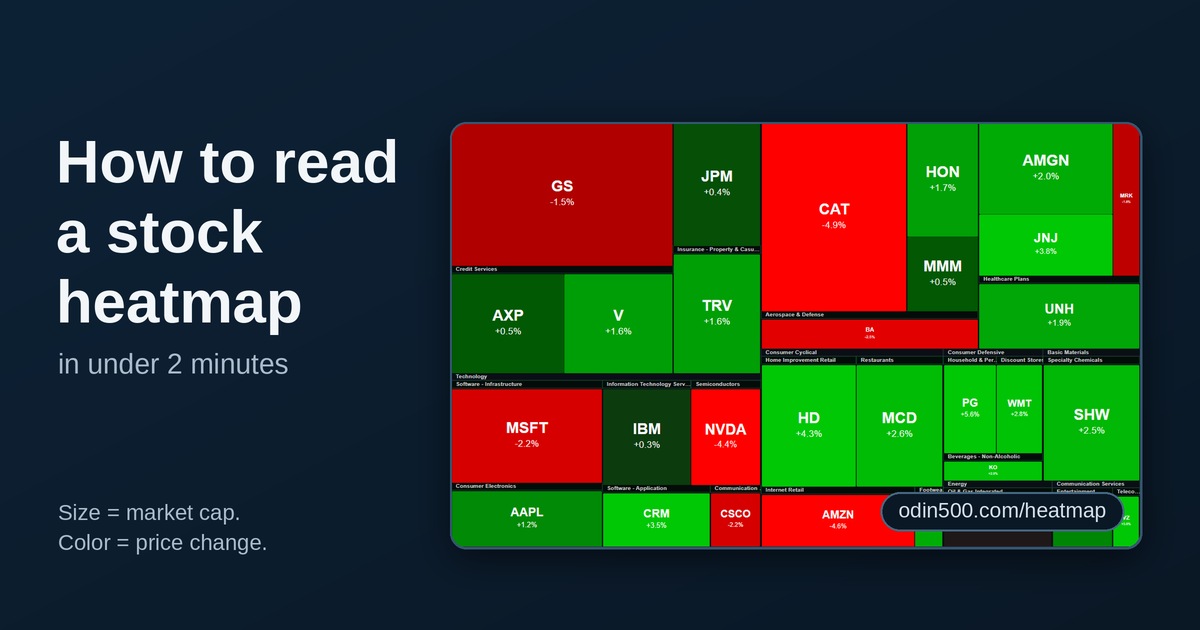
A stock heatmap is a map of the market made of colored tiles, and each tile is a company. Bigger tiles mean bigger companies. The color tells you whether the price went up or down. Once you know that, you can learn how to read a stock heatmap in about two minutes, and it'll tell you more about a trading day than the index number alone.

The example below is a general walkthrough, not a specific day. Open today's map and run the same four steps.

What is a stock heatmap?

The layout is called a treemap. Computer scientist Ben Shneiderman came up with it around 1990 at the University of Maryland, to show how disk space was being used. Finance borrowed it because it works just as well for money.

Two things carry almost all the meaning:

  1. Size shows market capitalization. A bigger company gets a bigger tile.

  2. Color shows the price change over the period you picked. Green means up, red means down, and a deeper shade means a bigger move.

Tiles are grouped by sector and industry, so the banks sit together and the chip makers sit together. Most heatmaps also let you switch the time frame from one day to a week, a month or a year.

How to read a stock heatmap in four steps

Each step should take about 30 seconds.

  1. Squint at the whole map. Mostly green or mostly red tells you whether the move was broad. A patchwork means investors were picking sides.

  2. Find the sector that stands out. One deep red block in a mostly green map is a sector story, not a market story. Look for the opposite too: a bright green block in a sea of red.

  3. Check the biggest tiles. Size follows market cap, so a handful of giants can swing an index on their own. If the largest tiles are green and the small ones are mixed, the index number flatters the day.

  4. Count colors and ignore size. Roughly compare how many tiles are green and how many are red. If the index is up but the red tiles outnumber the green ones, the rally is narrow.

You can practice all four steps on Odin500's stock market heatmap, which shows U.S. sector and industry performance with price change and market-cap sizing. Heatmaps are included in the free plan, so there's nothing to pay for. Odin500 runs on daily data, so it's best for end-of-day reads.

How the four steps work on a typical day

Picture a day when the major indexes all finish a little higher. On paper, that's a quiet green day. The heatmap can tell a different story, and the four steps show you how.

Step 1, the whole map. If the indexes are up, you'd expect mostly green. If big patches of red show up anyway, something specific is dragging, and it's worth finding out what.

Step 2, the sectors. Say communication services is deep red while technology glows green. That's a sector story. Maybe a couple of big names in the red block gave weak outlooks and the rest of the market shrugged it off.

Step 3, the big tiles. The largest tiles are the ones that move the index. If the giants are green and plenty of small tiles are red, the index number is flattering the day.

Step 4, the count. Compare green tiles with red ones and ignore size. Another quick check is new 52-week highs against new lows. A rally led by big names can sit next to lots of new lows underneath, because broad indexes like the Nasdaq Composite hold thousands of stocks, many of them small and speculative. That's what a narrow rally looks like.

Four quick looks, and you know who led the day, who dragged it, and how many stocks actually joined in. The index number alone can't tell you that.

Mistakes to avoid

  • Treating shade as an exact number. Heatmap color scales stop at a fixed point. Odin500's legend runs from -3% to +3%, which is common. On most heatmaps, anything beyond the end of the scale gets the same deepest shade, so a stock down 4% and one down 12% can look identical. Check the exact change in the table below the map.

  • Forgetting what size does. A giant tile grabs your eye first, but it may be just one company. Read the small tiles too.

  • Reading one day as a trend. A single red day says little. Look at a few days or weeks before you decide anything.

  • Mixing up the what and the why. A heatmap shows what moved, not why. A stock can beat earnings estimates and still fall if its outlook disappoints. When a tile catches your eye, check market movers or the sector data to dig in.

Key takeaways

  • Size shows market cap and color shows price change, so read both.

  • Start wide, then zoom in: whole map, sectors, big tiles, then the color count.

  • If the biggest tiles and the small tiles disagree, the index is hiding something.

  • Color scales are capped, so check the exact figure.

  • A heatmap tells you where to look, not what to buy.

Frequently asked questions

What is a stock heatmap?

A stock heatmap is a color-coded map of the market where each tile is a company. Tile size usually shows market capitalization, and color shows how much the price rose or fell over the chosen period.

What do the colors on a stock heatmap mean?

Green means the price rose and red means it fell. Darker shades mean bigger moves, up to the limit of the color scale, which is often around 3%.

Is a stock heatmap useful for beginners?

Yes. It shows sector leadership and market breadth faster than a list of tickers, and it helps you see why an index moved. It doesn't explain the cause or predict what comes next, so pair it with the news and your own research.

How often should I check a heatmap?

Once at the close is enough for most investors. Checking during the day mostly shows noise, because early moves often fade.

This article is for educational purposes only and is not investment advice.

← Back to Blog

Build an AI portfolio in minutes

Give Claude, ChatGPT, Gemini or Grok a mandate and watch it trade a $100,000 virtual book against the S&P 500, Nasdaq-100 and Dow — with every position and trade on record.

See the AI portfolios

Free to start. No card required.

Odin500 Blog

How to Read a Stock Heatmap: 4 Steps for Beginners

Ashutosh pandey · October 23, 2026

A stock heatmap is a map of the market made of colored tiles, and each tile is a company. Bigger tiles mean bigger companies. The color tells you whether the price went up or down. Once you know that, you can learn how to read a stock heatmap in about two minutes, and it'll tell you more about a trading day than the index number alone.

The example below is a general walkthrough, not a specific day. Open today's map and run the same four steps.

What is a stock heatmap?

The layout is called a treemap. Computer scientist Ben Shneiderman came up with it around 1990 at the University of Maryland, to show how disk space was being used. Finance borrowed it because it works just as well for money.

Two things carry almost all the meaning:

  1. Size shows market capitalization. A bigger company gets a bigger tile.

  2. Color shows the price change over the period you picked. Green means up, red means down, and a deeper shade means a bigger move.

Tiles are grouped by sector and industry, so the banks sit together and the chip makers sit together. Most heatmaps also let you switch the time frame from one day to a week, a month or a year.

How to read a stock heatmap in four steps

Each step should take about 30 seconds.

  1. Squint at the whole map. Mostly green or mostly red tells you whether the move was broad. A patchwork means investors were picking sides.

  2. Find the sector that stands out. One deep red block in a mostly green map is a sector story, not a market story. Look for the opposite too: a bright green block in a sea of red.

  3. Check the biggest tiles. Size follows market cap, so a handful of giants can swing an index on their own. If the largest tiles are green and the small ones are mixed, the index number flatters the day.

  4. Count colors and ignore size. Roughly compare how many tiles are green and how many are red. If the index is up but the red tiles outnumber the green ones, the rally is narrow.

You can practice all four steps on Odin500's stock market heatmap, which shows U.S. sector and industry performance with price change and market-cap sizing. Heatmaps are included in the free plan, so there's nothing to pay for. Odin500 runs on daily data, so it's best for end-of-day reads.

How the four steps work on a typical day

Picture a day when the major indexes all finish a little higher. On paper, that's a quiet green day. The heatmap can tell a different story, and the four steps show you how.

Step 1, the whole map. If the indexes are up, you'd expect mostly green. If big patches of red show up anyway, something specific is dragging, and it's worth finding out what.

Step 2, the sectors. Say communication services is deep red while technology glows green. That's a sector story. Maybe a couple of big names in the red block gave weak outlooks and the rest of the market shrugged it off.

Step 3, the big tiles. The largest tiles are the ones that move the index. If the giants are green and plenty of small tiles are red, the index number is flattering the day.

Step 4, the count. Compare green tiles with red ones and ignore size. Another quick check is new 52-week highs against new lows. A rally led by big names can sit next to lots of new lows underneath, because broad indexes like the Nasdaq Composite hold thousands of stocks, many of them small and speculative. That's what a narrow rally looks like.

Four quick looks, and you know who led the day, who dragged it, and how many stocks actually joined in. The index number alone can't tell you that.

Mistakes to avoid

  • Treating shade as an exact number. Heatmap color scales stop at a fixed point. Odin500's legend runs from -3% to +3%, which is common. On most heatmaps, anything beyond the end of the scale gets the same deepest shade, so a stock down 4% and one down 12% can look identical. Check the exact change in the table below the map.

  • Forgetting what size does. A giant tile grabs your eye first, but it may be just one company. Read the small tiles too.

  • Reading one day as a trend. A single red day says little. Look at a few days or weeks before you decide anything.

  • Mixing up the what and the why. A heatmap shows what moved, not why. A stock can beat earnings estimates and still fall if its outlook disappoints. When a tile catches your eye, check market movers or the sector data to dig in.

Key takeaways

  • Size shows market cap and color shows price change, so read both.

  • Start wide, then zoom in: whole map, sectors, big tiles, then the color count.

  • If the biggest tiles and the small tiles disagree, the index is hiding something.

  • Color scales are capped, so check the exact figure.

  • A heatmap tells you where to look, not what to buy.

Frequently asked questions

What is a stock heatmap?

A stock heatmap is a color-coded map of the market where each tile is a company. Tile size usually shows market capitalization, and color shows how much the price rose or fell over the chosen period.

What do the colors on a stock heatmap mean?

Green means the price rose and red means it fell. Darker shades mean bigger moves, up to the limit of the color scale, which is often around 3%.

Is a stock heatmap useful for beginners?

Yes. It shows sector leadership and market breadth faster than a list of tickers, and it helps you see why an index moved. It doesn't explain the cause or predict what comes next, so pair it with the news and your own research.

How often should I check a heatmap?

Once at the close is enough for most investors. Checking during the day mostly shows noise, because early moves often fade.

This article is for educational purposes only and is not investment advice.

← Back to Blog

Build an AI portfolio in minutes

Give Claude, ChatGPT, Gemini or Grok a mandate and watch it trade a $100,000 virtual book against the S&P 500, Nasdaq-100 and Dow — with every position and trade on record.

See the AI portfolios

Free to start. No card required.

Recommended reading

  • Market Movers Today: Top Gainers and Losers on Wall Street
  • What Is an AI Stock Portfolio? A Complete Guide for Investors
  • Wall Street This Week: What's Actually Moving U.S. Stocks
  • The AI Slowdown Debate: What It Means for the U.S. Market and the Nasdaq